Built for Bookkeeping & CAS Firms

An Accounting Platform for Modern Firms—and the Clients They Serve

Serve more clients with the same team — standardize the work, automate the busywork, and keep every close moving without adding headcount.

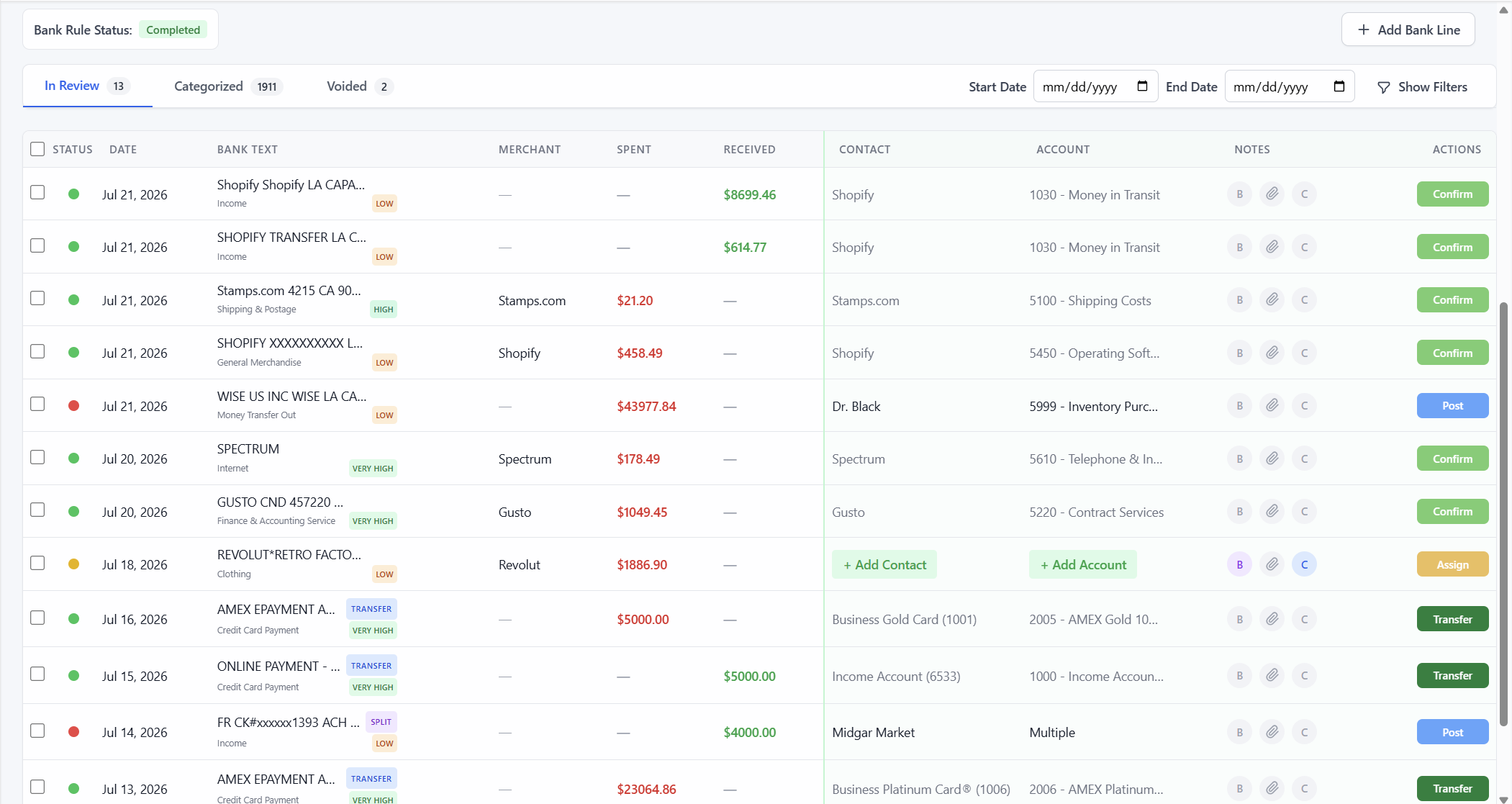
Flow Keeping Accounting Transaction Categorization tab with account cards, review queue, and confirm actions
Transaction categorizationReview, confirm, and keep client work moving
Current

Same team. More clients.

  • Start with 1–2 clients
  • Founder-led onboarding
  • Migration and opening-balance support
  • No firm-wide commitment
  1. Standardize every client

    Use a repeatable setup, review, close, and reporting process across the firm.

  2. Automate repetitive work

    Reduce manual categorization, transfer matching, selling-channel journals, and cleanup.

  3. Finish cleaner closes

    Keep reconciliation, adjustments, trial balance review, and supporting detail together.

  4. Deliver better insight

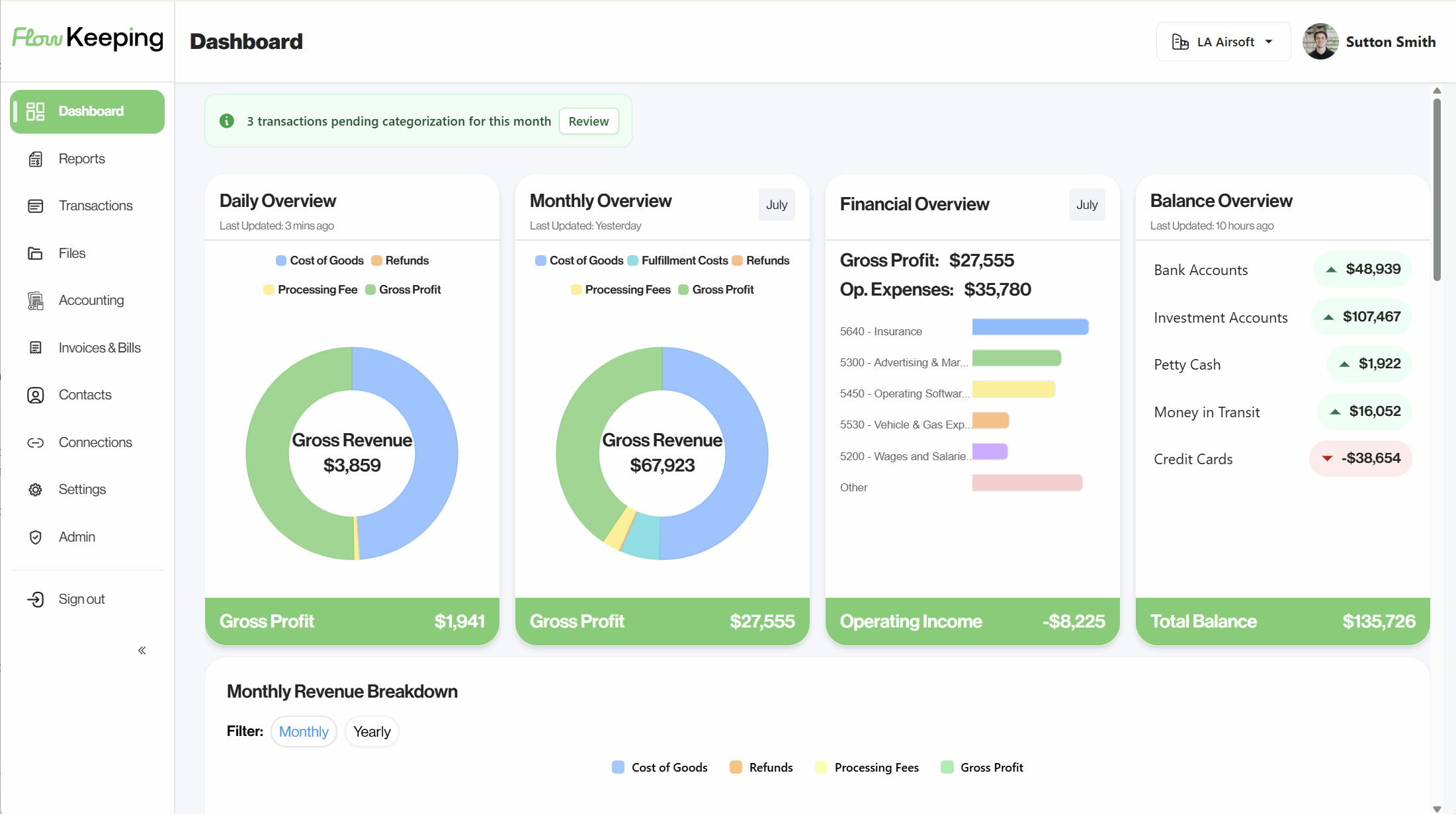
    Give clients live sales, banking, accounting, and performance visibility.

Firm partner intro

Serve more clients with the team you have.

Why Flow’s partner program helps bookkeeping and CAS firms standardize work, automate the busywork, and grow capacity without growing headcount at the same rate.

The workflow problem

Your firm should not need six tools to finish one set of books.

Most bookkeeping friction is not caused by one difficult transaction. It comes from rebuilding context across bank feeds, selling channels, spreadsheets, email threads, shared drives, close checklists, and client-facing reports.

  1. Intake

    Client activity arrives scattered.

    Banks, cards, POS systems, selling channels, processor payouts, files, and client explanations all enter through different paths.

  2. Close

    The close lives in your team's memory.

    Progress is tracked in spreadsheets, inboxes, and separate task tools, making it harder to see what is complete and what still needs judgment.

  3. Delivery

    Clients see the result too late.

    Even when the books are accurate, the client often receives a static report after the decision window has already passed.

One operating workflow

Flow turns that fragmented process into one operating workflow.

Connect the activity, standardize the bookkeeping structure, automate the repeatable work, review exceptions, reconcile, report, and communicate without leaving the platform.

  1. Onboarding / Migration
  2. Categorization
  3. Reconciliation
  4. Sales Journals
  5. Reporting
  6. Client communication

Automation as the baseline

Automate the repeatable work. Keep judgment with your bookkeepers.

Flow is designed around exception-based review. Predictable activity follows standardized accounting logic, while ambiguous items remain visible for your team to review, document, and complete.

  • Transaction categorization and layered bank rules reduce repetitive coding while preserving firm control.
  • Smart transfer recognition helps identify movement between connected bank and card accounts.
  • Standardized account structures and opening-balance workflows give each client a cleaner starting point.
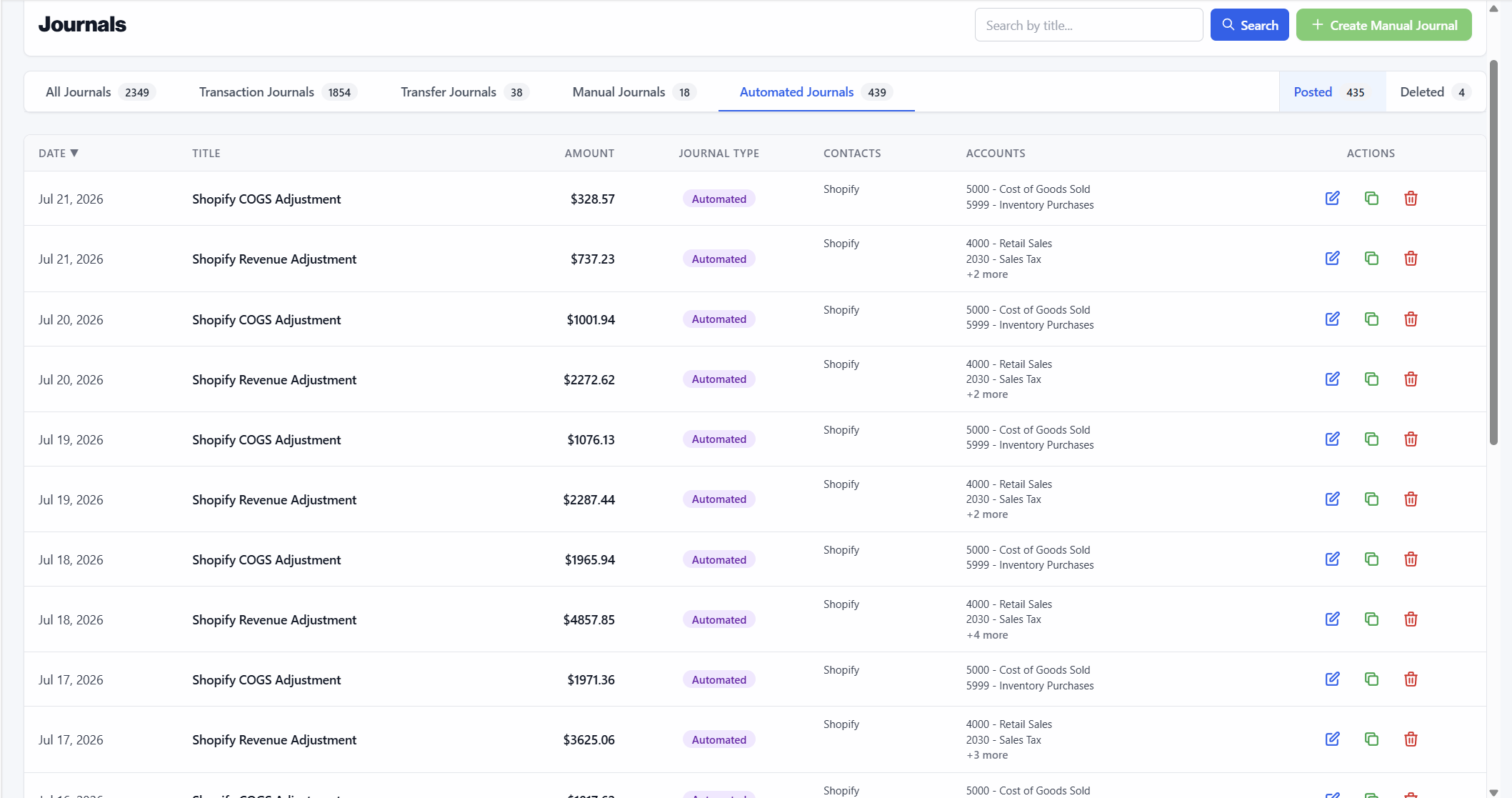
  • Automated selling-channel journals convert complex commerce activity into organized accounting entries.
  • Review queues and attached context keep exceptions from disappearing into side spreadsheets.
Flow Keeping transaction categorization with review queue and confirm actions
Transaction categorization
Flow Keeping automated journals for selling-channel entries
Automated journals
  • Set the standard once

    Build a repeatable operating model for how your firm handles client activity.

  • Review what matters

    Let the system process predictable work and surface the items that need judgment.

  • Scale with consistency

    Add clients without reinventing the process for every bookkeeper on the team.

Close & commerce included

The close tools and commerce accounting your firm already expects.

  • Bank reconciliationStatement balances, cleared activity, outstanding items, and remaining differences in one workflow.
  • Trial balance & journalsAccountant-focused review, manual journals, and account drill-down before reports are finalized.
  • Commerce journalsSelling-channel and POS activity becomes structured entries — not net deposits rebuilt by hand.
  • Money in transitPayouts and timing differences stay visible between commerce activity and the bank.

Quick migration

Migrate and set up a client in minutes.

See how a client moves onto Flow — connections, setup, and a clean starting point without a messy firm-wide cutover.

Client collaboration in context

Client questions belong on the transaction—not buried in email.

Flow keeps communication and documentation attached to the work that created it. Your team can see what was asked, what was answered, what support exists, and what still needs attention without reconstructing the conversation.

  • Transaction comments keep questions, answers, and explanations with the entry.
  • Bookkeeper and client notes preserve internal context while keeping client-facing follow-up clear.
  • Flow Drive centralizes statements, receipts, contracts, support, and recurring client files.
  • A living review trail helps your team understand why an item was handled the way it was.

One system, two useful views

Reports your team can trust—and clients can understand.

Bookkeepers need accounting detail. Clients need a clear view of what the numbers mean. Flow serves both from the same current ledger.

Bookkeeper view

Review the books with the detail your team expects.

Move from financial statements into trial balance, journal activity, account detail, reconciliation status, and the transactions behind each balance.

  • Profit & Loss
  • Balance Sheet
  • Trial Balance
  • Journal Detail
  • Account Drill-down
  • Reconciliation Status

Client view

Give clients current insight without maintaining a second reporting stack.

The same accounting work powers a live view of sales, banking, cash, margin, expenses, balances, and financial performance.

Notes live on the transaction — not in email

  • SalesCurrent channel activity
  • CashConnected bank visibility
  • ProfitabilityRevenue, COGS, fees, margin

Start with one client

Do not switch the whole firm. Prove the workflow first.

The easiest way to evaluate Flow is with one client that creates enough friction for the improvement to be obvious—without making a firm-wide decision on day one.

  1. Choose the right pilot client.

    Identify one or two clients with selling-channel complexity, repetitive bank work, messy communication, or limited financial visibility.

  2. Set up the books together.

    Flow supports the account structure, connected sources, opening balances, rules, journals, and workflows needed to get the client operating correctly.

  3. Measure the workflow, then expand.

    Evaluate the time saved, the quality of the close, the client experience, and the value of moving additional clients onto the platform.

Founder-led onboarding and migration support are included in the partner pilot.

Partner FAQs

Setup, security, and banks — what firms ask before connecting clients.

How hard is it to move a client onto Flow?

Don’t flip the whole firm. Start with one or two clients. We help set up accounts, opening balances, and connections so the first client is a clean test — not a risky cutover.

Is client bank data safe?

Bank links go through Plaid. Flow never sees the client’s bank login or password. Client data stays in their workspace for your firm and the client — we don’t sell it.

What happens to data if a client or firm leaves?

Client data is still theirs. You can ask for an export, and we can delete what’s left on request.

Which banks and cards can clients connect?

Whatever Plaid supports — most major U.S. banks and cards. If a client’s bank is odd, check it on a partner demo before you pilot them.

Is Flow the full books, or something we bolt onto QuickBooks?

Full books for the client. Categorization, rules, journals, reconciliation, reports, and client dashboards live here — not as a sidecar to another ledger.

Can clients see the dashboard while we run the books?

Yes. They get live sales, banking, cash, and reports. Your firm still owns the accounting work and the client relationship.

Product walkthroughWatch the full demo1:23 · see the product in action

A short product tour of Flow Keeping — useful if you’ve scrolled this far and want the full picture before booking a partner demo.

Founder-Led Partner Demo

See how Flow fits your firm—starting with one client.

Meet directly with Sutton to map Flow to your current process, identify a practical pilot client, and see how the platform handles the work from connected activity through close and client reporting. Leave with a clear pilot plan—without a firm-wide commitment.